
AutomateWisely Editorial Team · Last reviewed October 30, 2026 · How we research
Most comparisons of n8n, Make and Zapier repeat each vendor’s feature list. We did something simpler: we built the same workflow in all three, ran the same rows through it on the same day, and wrote down what happened, including the parts that went wrong.
Short answer. Zapier was the most guided and the easiest to trust on day one, but it counts every row you move, so cost grows fastest with volume. Make was quick to set up and the cheapest paid entry point, but its free plan only checks every 15 minutes and it uses credits even on checks that find nothing. n8n was the fastest to react and the most economical when many rows arrive together, because it counts runs, not rows, but it asks you to think more like a developer.
If you want something working this afternoon, start with Zapier. If you run many small workflows on a budget, look at Make. If volume or control matters most, n8n.
How we tested
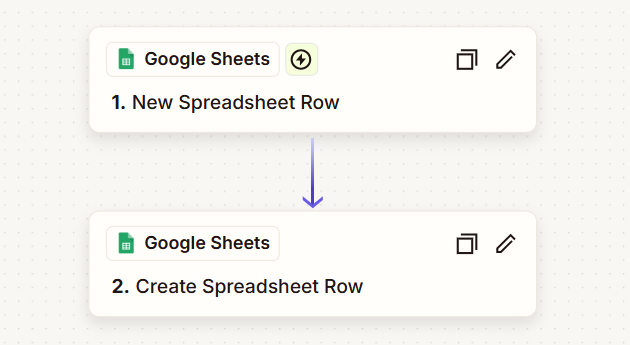
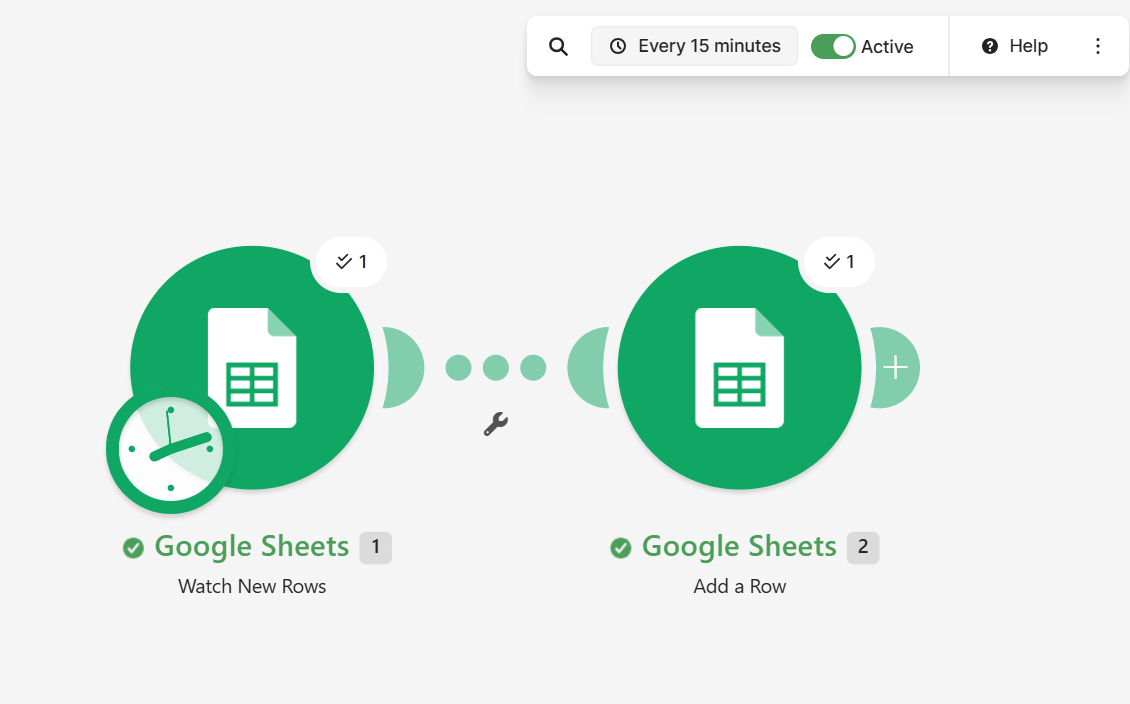
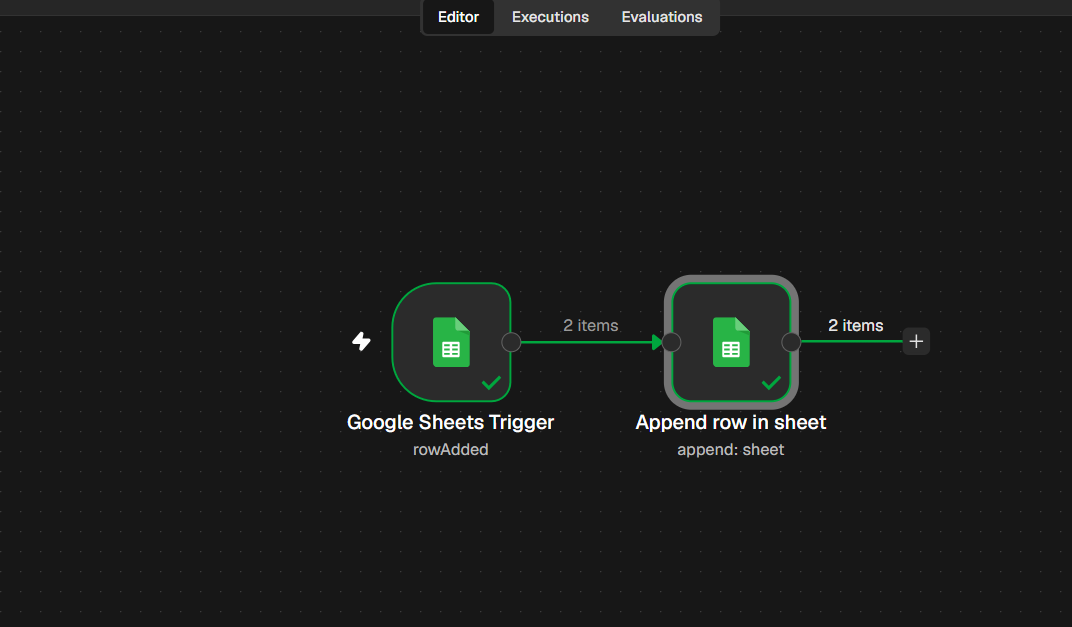
We wanted a test that anyone can repeat on a free or trial account, so we picked one of the most common small business automations: when a new lead lands in a Google Sheet, copy it to a second tab. No AI step and no paid apps, so the three tools start from the same place.
One honest caveat: we built them in the order Zapier, Make, n8n. By the third tool we knew exactly what we wanted, which helps n8n’s setup time. The other results do not depend on order.
The results side by side
| What we measured | Zapier | Make | n8n |
|---|---|---|---|
| Time to build | 17 min 25 s | 12 min 39 s | 9 min 31 s |
| Delay before a new row was copied | About 2 to 3 minutes | Up to 15 minutes | Under 2 minutes |
| Rows copied in the clean test | 3 of 3, no duplicates | 3 of 3, no duplicates | 3 of 3, no duplicates |
| Order of rows | Not always in order | In order | In order |
| Where new rows were written | After the last row | In the first empty row it found | After the last row |
| Usage after the whole test | 9 tasks for 9 runs | 17 credits for about 10 rows | 3 executions for about 10 rows |
| Usage unit | Task: each successful action | Credit: each module action | Execution: each full run |
Setup: who holds your hand
Zapier
Zapier walks you through each step in a side panel: pick the app, pick the event, connect the account, choose the sheet, test. Every step shows a check mark when it works, which makes it hard to get lost. Our only stumble was choosing “New or Updated Spreadsheet Row” instead of “New Spreadsheet Row”, two events with very similar names that behave differently.
Make
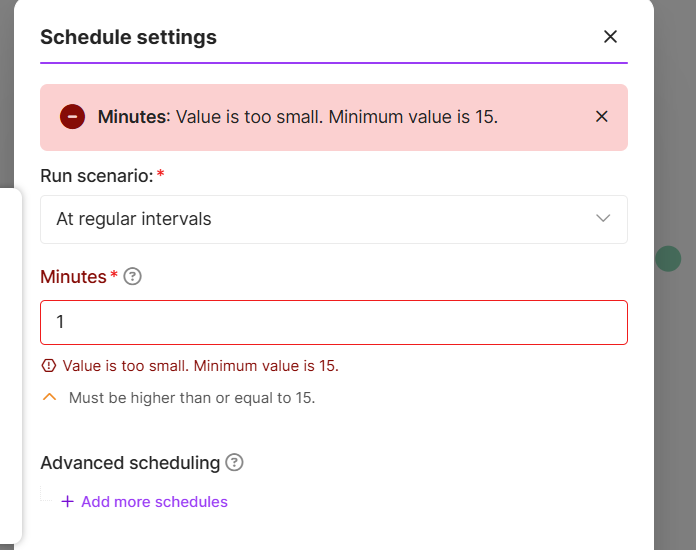
Make shows the workflow as circles on a canvas, which makes the data flow easy to see. Two things slowed us down. It asked where to start processing data and offered no clear “from now on” option; the option we chose also processed the sample row we had selected. And it refused a 1 minute schedule on the free plan:
n8n
n8n uses nodes and shows the actual data entering and leaving each one, which is great for spotting mistakes. You map fields by dragging them into expressions such as {{ $json.Name }}, which feels technical at first but is very precise. It was also the only tool that let us check for new rows every minute during the trial.
What the test taught us about cost
This was the most useful finding. The three tools count usage in completely different ways, and the difference grows with volume.
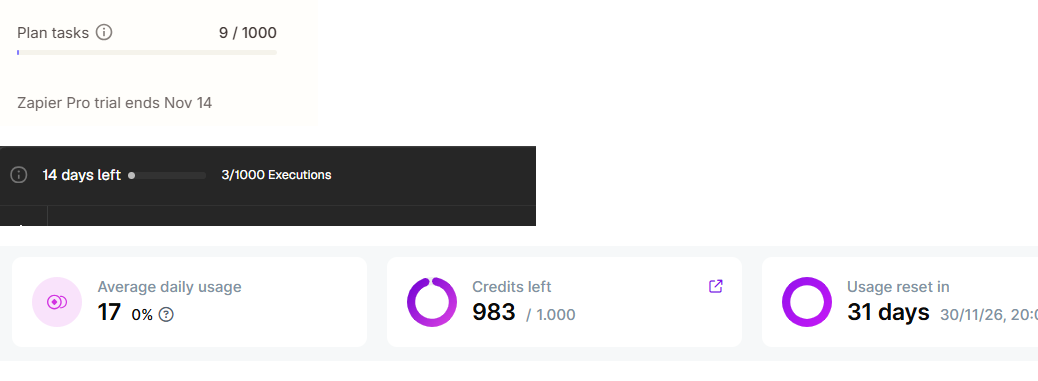
- Zapier counts a task for each successful action. Triggers and checks for new data are free, so our 9 runs used exactly 9 tasks.
- Make counts credits for module actions. We used 17 credits to copy about 10 rows over roughly 90 minutes of scheduled checks, which matches about one credit per scheduled check plus one per row written. Check the scenario history on your own account, because the exact count depends on your modules.
- n8n counts an execution for each full run of the workflow, however many steps or rows it handles. When several rows arrived together, one execution copied them all, so about 10 rows used just 3 executions.
The practical consequence for Make: if its count of one credit per scheduled check holds for your scenario, a single workflow checking every 15 minutes, day and night, uses about 2,880 credits a month before it moves any data. That is far more than the 1,000 free credits, so on the free plan it makes sense to schedule checks only during working hours or use an instant webhook trigger where the app supports it.
Estimate your monthly usage in each tool
Enter one workflow. The estimate uses the counting rules above and the patterns we saw in our test.
Estimates only, based on a 30 day month. Real usage depends on your apps, filters, errors and how items arrive. The bars compare each figure with the free or trial allowance we saw: 100 tasks on Zapier Free, 1,000 credits on Make Free and 1,000 executions on the n8n Cloud trial.
Three things that went wrong, and what they teach
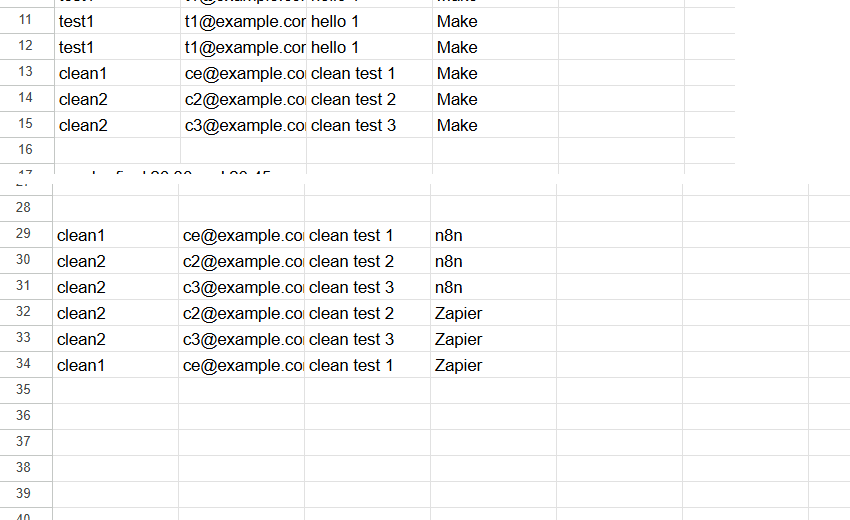
In our first round we created test rows by copying the first one and then changing the text. All three tools picked up the copies before we finished editing, so the Log filled with duplicates of “test1”, and later edits were never sent.
Lesson: “new row” triggers read a row once, when it first appears. Add complete rows in one go (paste them or use a form), and never build automations on rows that people edit afterwards. For that, use an “updated row” trigger instead.
Make’s Add a Row placed its rows in an empty gap near the top of the Log tab, while Zapier and n8n wrote at the bottom. If your sheet has blank rows in the middle, Make’s data can end up in an unexpected place.
Lesson: keep destination sheets free of empty rows, or write to a dedicated tab.
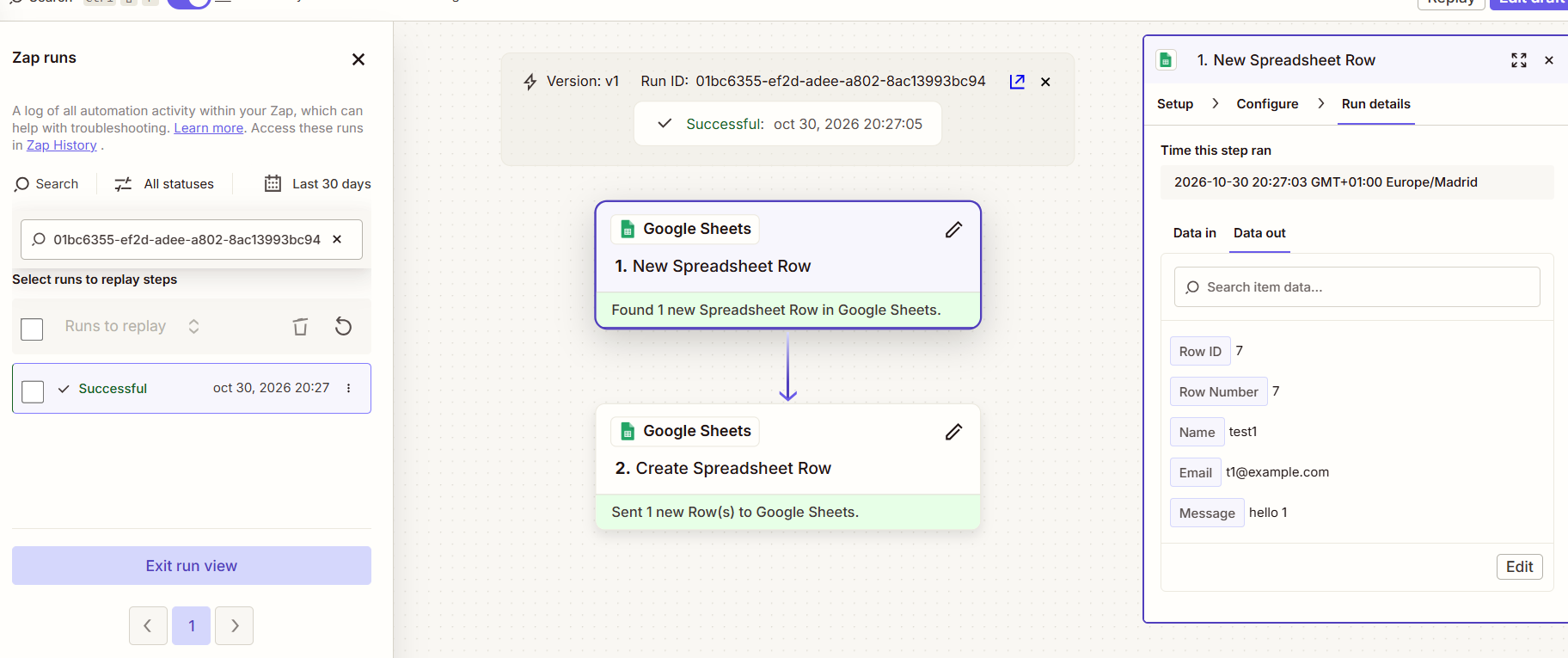
When three rows arrived together, Zapier copied the second and third first and the first one a minute later. All three arrived, just not in sequence.
Lesson: if order matters, add a timestamp column and sort the destination, rather than relying on arrival order.
Prices, checked on October 30, 2026
Plans change often, so treat these as a starting point and confirm on each pricing page before you buy.
- Zapier: the Free plan includes 100 tasks a month, two step Zaps and checks every 15 minutes. Professional starts from $19.99 a month with multi step Zaps and 2 minute checks; Team starts from $69 a month. Our account showed 1,000 tasks during the Pro trial.
- Make: the Free plan includes 1,000 credits a month. Paid plans are sold by credits; for 10,000 credits a month, Core was listed at about $9 a month billed annually or $10.59 monthly when Jet Admin checked prices in September 2026.
- n8n: n8n Cloud Starter is 20 euros a month billed annually for 2,500 executions, and Pro is 50 euros a month for 10,000. The Cloud trial needs no credit card and allows 1,000 executions. The self-hosted Community edition is free to download, but you pay for and maintain the server.
Which one should you choose?
you want the gentlest learning curve, need apps that only Zapier connects, or run a modest number of tasks. Watch the task count as volume grows.
you like seeing the whole flow on a canvas, run many small workflows and want a low paid entry price. Plan schedules carefully so checks do not eat your credits.
items arrive in batches or volumes are high, you want fast checks, or you need self hosting for data control. Expect a more technical interface.
Already on Zapier and paying too much? See our guide to Zapier alternatives. Choosing your first tool for a small team? Start with workflow automation software for small business. For deeper looks at each platform, read our Make review and n8n review, and see a real use case in automating invoice processing.
Questions readers ask
Is n8n really free?
The self-hosted Community edition is free to download and use, but you need a server and the skills to keep it updated and secure. n8n Cloud, the hosted version, is a paid subscription after the trial.
Do triggers count toward usage?
On Zapier, no: triggers and checks for new data do not use tasks. On Make, credits are counted for module actions, and in our test the scheduled checks themselves appeared to use credits. On n8n, you pay per execution, whatever the trigger does.
Which tool reacted fastest?
In our test, n8n copied new rows in under 2 minutes, Zapier in about 2 to 3 minutes during its Pro trial and Make in up to 15 minutes, the minimum schedule on its free plan. Instant webhook triggers, where available, avoid these delays in all three tools.
Can I move a workflow from Zapier to Make or n8n?
Not automatically. You rebuild it in the new tool. For simple workflows like ours that takes 10 to 20 minutes; complex ones with filters and paths take longer, so migrate one workflow at a time and run both in parallel for a few days.
Why did our test create duplicate rows?
Because we copied rows and edited them afterwards. The tools read each new row once, when it appears, so they captured the copied values. Pasting complete rows in one go fixed it in all three tools.
The bottom line
All three tools did the job once we fed them clean data. The real differences are in how they count usage, how fast they react on cheaper plans and how much they guide you. Build one real workflow on each free plan or trial, as we did, and look at the usage counter after a week: it will tell you more about your future bill than any feature list.
Sources
- Zapier, Plans and Pricing (checked October 30, 2026)
- Zapier, What is a task in Zapier?
- Make, Pricing and Subscription Packages (checked October 30, 2026)
- Make Help Center, Cancel your subscription (free plan credit allowance)
- n8n, Plans and Pricing (checked October 30, 2026)
- Jet Admin, Make.com Pricing in 2026 (prices checked September 26, 2026)
- AutomateWisely hands-on test, October 30, 2026: screenshots in this article
AutomateWisely is independent and is not paid by Zapier, Make or n8n. We used free plans and trials for this test and have no affiliate links in this article. Results reflect one simple workflow on one day; your results will vary with your apps and volumes.