
AutomateWisely Editorial Team · Last reviewed October 30, 2026 · How we research
n8n has a reputation: powerful, cheap, a bit technical, and “only for developers”. We set up a real workflow on the n8n Cloud trial to find out which parts of that reputation hold up. This review is organised around the questions we had before we started, answered with what we actually saw.
What we expectedOnly developers can use it.
What we foundWe built a working Google Sheets workflow in 9 minutes 31 seconds without writing code. Field mapping uses expressions, which looks technical but is drag and drop.
What we expectedIt is free.
What we foundThe self-hosted edition is free to download, but you run the server. The hosted n8n Cloud is a paid subscription after a free trial.
What we expectedPricing is complicated.
What we foundIt is the simplest of the three tools we tested: you pay per full run of a workflow, whatever it does inside.
How hard is it to build a first workflow?
Our test workflow copies each new row from a “Leads” tab in Google Sheets to a “Log” tab. On n8n Cloud the steps were: create a workflow, add the Google Sheets Trigger set to “Row added”, sign in with Google, pick the document and sheet, then add an “Append row in sheet” node and map the columns. The home screen opens on an AI assistant that offers to build the workflow from a prompt; we skipped it to compare the three tools fairly.
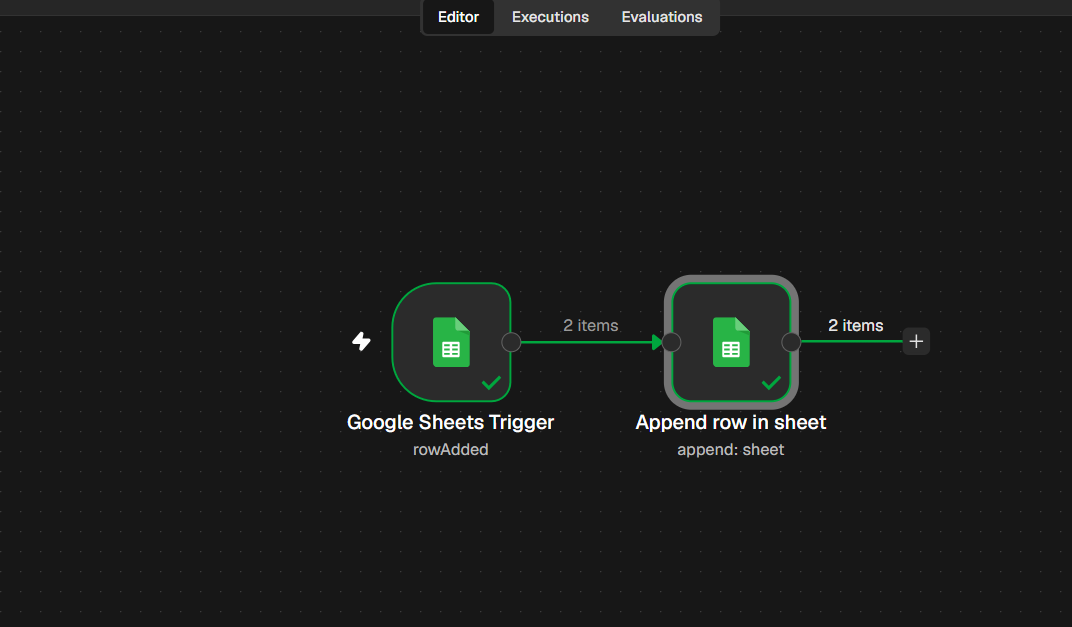
The part that feels most technical is mapping. Each field holds an expression such as {{ $json.Name }}. You do not type it: you drag the field from the input panel on the left, and n8n writes the expression and shows the resulting value underneath, which makes mistakes easy to spot.
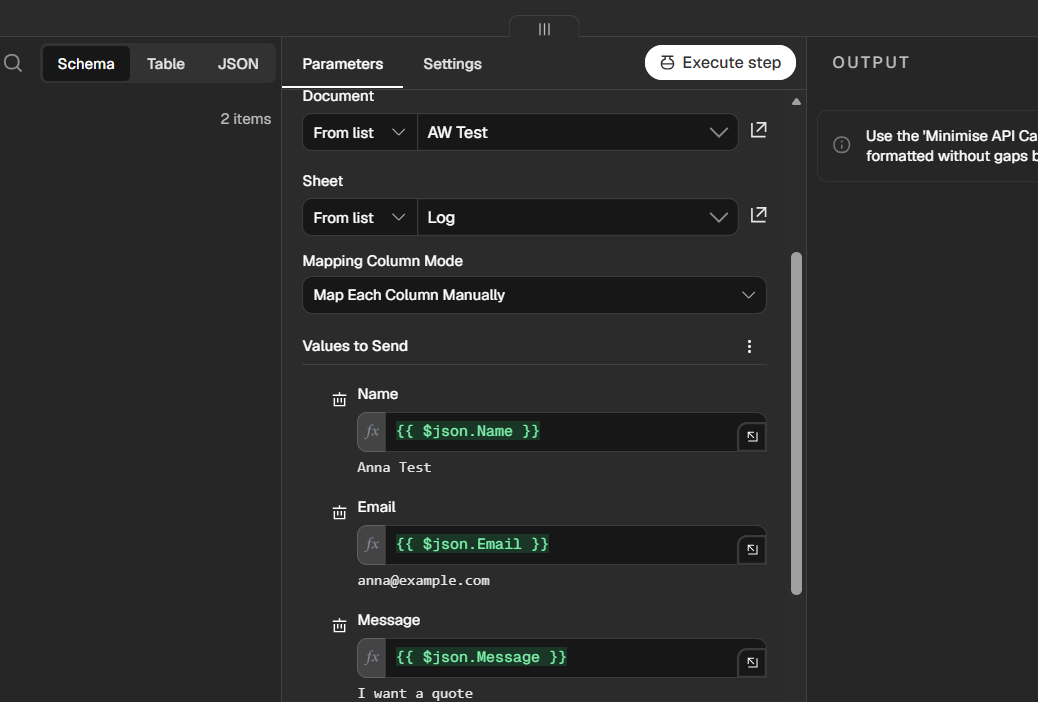
Setup took 9 minutes 31 seconds. To be fair, n8n was the third tool we built that evening, so we already knew exactly what we wanted. The guided setup in Zapier took us 17 minutes and Make 12 minutes; see the full n8n vs Make vs Zapier test.
How fast does it react?
The Google Sheets trigger let us check for new rows every minute during the trial, the shortest interval of the three tools. In our test, n8n copied new rows in under 2 minutes, faster than Zapier (about 2 to 3 minutes on its Pro trial) and Make (up to 15 minutes on its free plan).
One behaviour to know: when we first fetched test data, n8n picked up the two rows that already existed in the sheet and processed them together. Zapier and Make started from a single sample row.
What does “execution” mean, and why does it matter?
n8n’s pricing page defines an execution as a single run of an entire workflow, regardless of how many steps it has or how much data it processes. That single rule made the biggest difference in our test.
Our numbers. About 10 rows reached the Log tab through n8n, and the account showed 3 executions used. When several rows arrived between two checks, one run copied all of them.
For the same work, Zapier counted 9 tasks (one per row copied) and Make used 17 credits (one per check plus one per row).
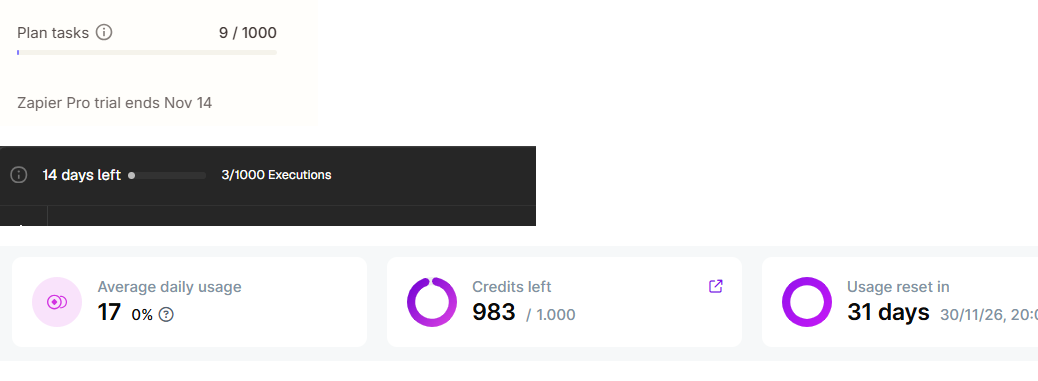
The flip side: if items arrive one at a time and slowly, each one triggers its own run, so executions get close to the number of items. Use the simulator below to see where your workflow falls.
Simulate your executions per month
Estimate for a 30 day month, assuming a check every minute, as on our trial. Real numbers depend on your trigger, filters and errors. n8n Cloud Starter includes 2,500 executions a month and Pro 10,000, according to n8n’s pricing page.
What does it cost?
Prices below are from n8n’s pricing page, checked on October 30, 2026. n8n lists annual billing prices in euros.
| Option | Price | Executions | Good to know |
|---|---|---|---|
| Cloud trial | Free | 1,000 | No credit card; our account showed 14 days |
| Cloud Starter | 20 euros a month, billed annually | 2,500 a month | Unlimited active workflows |
| Cloud Pro | 50 euros a month, billed annually | 10,000 a month | Unlimited active workflows |
| Community edition | Free to download | No n8n limit | You host, secure and update it |
Self hosting is where n8n stands apart from Zapier and Make: your data stays on your own server and there is no per execution fee. The real cost becomes the server, backups, updates and someone who can fix it when it breaks. n8n’s source is available under its own Sustainable Use License, so read the terms if you plan to offer it to clients as a service.
Where n8n tripped us up
- Edited rows. We created test rows by copying one and editing it. n8n read some copies before we finished editing, so one row arrived with the old message. “Row added” triggers read a row once; add complete rows in one go.
- A duplicate. In the same messy first round, one copied row was processed twice. In a clean second test, where we pasted complete rows at once, n8n copied all three rows once each, in order.
- The trial clock. The Cloud trial is time limited and capped at 1,000 executions, so build and test your real workflow early rather than exploring for two weeks.
Who should use n8n?
Teams with batches or high volumes, workflows with many steps, anyone who wants fast checks, and companies that need self hosting for data control.
People who want the most guided setup, or who will never touch expressions or data structures. Zapier is gentler for them.
Rebuild one real workflow on the Cloud trial and look at the execution counter after a few days.
See our Make review, Zapier alternatives and how to build an AI agent, a common next step on n8n.
Quick answers
Is n8n free?
The self-hosted Community edition is free to download and use for your own workflows; you pay for the server. n8n Cloud is paid after the trial, from 20 euros a month billed annually.
Do more steps cost more on n8n?
No. An execution is one run of the whole workflow, so a 3 step and a 15 step workflow cost the same per run.
Can a non developer use n8n?
For simple workflows, yes: we built ours without code. Expect a steeper learning curve than Zapier once you add branches, loops or data transformations.
Does n8n have an AI builder?
Our Cloud account opened on an assistant that offers to build workflows from a prompt. We built manually for a fair comparison, so we have not tested how reliable it is.
Our verdict
n8n lived up to the “powerful and economical” part of its reputation, and the “only for developers” part is overstated for simple workflows. Its execution based pricing is the clearest and, for batches, the cheapest of the three tools we tested. If you are comfortable with a slightly more technical interface, or you need self hosting, it should be on your shortlist.
Sources
- n8n, Plans and Pricing (checked October 30, 2026)
- n8n, n8n’s new pricing explained
- Zapier, Plans and Pricing (for comparison)
- Make Academy, Using credits effectively in scenarios (for comparison)
- AutomateWisely hands-on test on the n8n Cloud trial, October 30, 2026
AutomateWisely is independent and is not paid by n8n or its competitors. We tested on a free trial and have no affiliate links in this review. Prices and plans change; confirm them on n8n’s pricing page before you buy.